Appearance
██╗      ██████╗  █████╗ ██████╗       ██████╗ ██╗   ██╗██╗     ███████╗███████╗
██║     ██╔═══██╗██╔══██╗██╔══██╗      ██╔══██╗██║   ██║██║     ██╔════╝██╔════╝
██║     ██║   ██║███████║██║  ██║█████╗██████╔╝██║   ██║██║     ███████╗█████╗
██║     ██║   ██║██╔══██║██║  ██║╚════╝██╔═══╝ ██║   ██║██║     ╚════██║██╔══╝
███████╗╚██████╔╝██║  ██║██████╔╝      ██║     ╚██████╔╝███████╗███████║███████╗
╚══════╝ ╚═════╝ ╚═╝  ╚═╝╚═════╝       ╚═╝      ╚═════╝ ╚══════╝╚══════╝╚══════╝
Load testing tool built in Go which works based on the Raft consensus algorithm. Designed for scalable and distributed benchmarking using Dockerized microservices.
Overview
Load-Pulse is a distributed load testing tool that uses Dockerized microservices and the Raft consensus algorithm to perform scalable performance testing of web APIs and services. It provides a simple CLI interface for defining and executing load tests, with automatic aggregation and reporting of results.
High-level Architecture
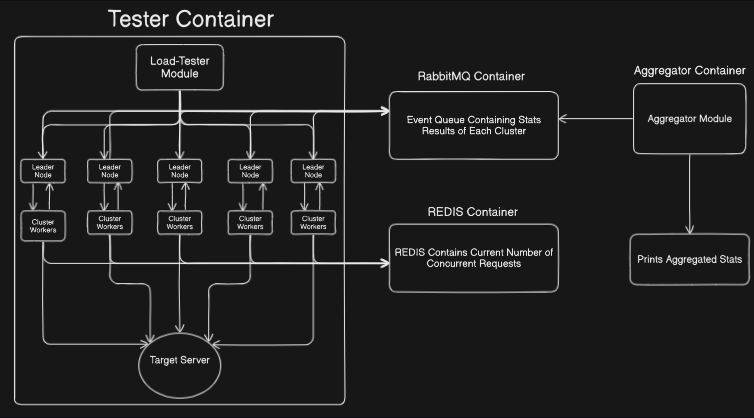
Load-Pulse consists of multiple microservices working together:
- Load Tester nodes that generate HTTP requests
- Aggregator service that collects and processes statistics
- Redis for coordination and state management
- RabbitMQ for message queuing between services
Quick Start
Get started with Load-Pulse in three steps:
1. Install Load-Pulse
bash
go install github.com/Naganathan05/Load-Pulse@latest
For detailed installation instructions, see the Installation Guide.
2. Create a Test Configuration
Use the interactive wizard to create your test configuration:
bash
loadpulse init
Or manually create a testConfig.json file. See the Configuration Reference for details.
3. Run Your Load Test
bash
loadpulse run --config testConfig.json
View the Commands documentation for all available commands and options.
Documentation
- Installation – Complete installation guide and setup instructions
- Commands – Detailed CLI command reference with examples
- Configuration Reference – Complete
testConfig.jsonfield documentation - Results – Understanding and interpreting load test results
Key Features
- Distributed Testing – Uses multiple Docker containers for scalable load generation
- Raft Consensus – Ensures reliable coordination between test nodes
- Simple Configuration – JSON-based configuration with interactive setup wizard
- Comprehensive Metrics – Response times, error rates, throughput, and more
- Docker-Based – Easy deployment and isolation using Docker containers
Example Workflow
bash
# 1. Create configuration
loadpulse init

# 2. Validate configuration
loadpulse validate testConfig.json

# 3. Run load test
loadpulse run --config testConfig.json

# 4. Review results (displayed automatically)
Learn More
- Explore the Commands documentation to see all available options
- Read the Configuration Reference to understand all configuration options
- Check the Results guide to learn how to interpret your test output